
Step 1: Make Sure Your Campaigns Are Set Up
Your Campaigns are the foundation of everything in Cloverleaf AI - they determine what shows up in your Signals emails and what gets analyzed by your AI Insights. If your Campaigns are already configured, you're ready to go. If not, see this article to get started: Insight Campaign or Standard Campaign
Step 2: Review Your Signals Email Every Morning
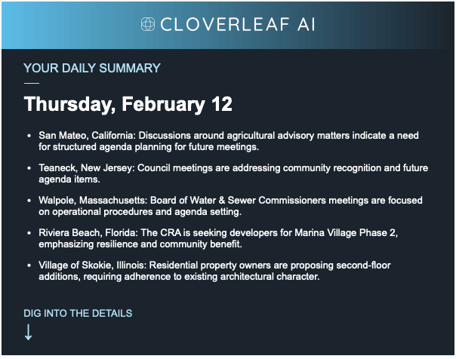
Each morning, Cloverleaf AI delivers a Signals email to your inbox surfacing meetings and documents from the previous 24 hours that matched your Campaign keywords and geographic filters.
Scan the results for mentions of your issues, clients, or opposition activity. Click any meeting title to open it directly in Cloverleaf AI for a closer look.
Step 3: Review the Meeting
Inside a meeting, you'll see transcript snippets highlighting exactly where your keywords appeared. Click any timestamp to jump directly to that moment in the video - so you can hear exactly what was said and in what context.
Use this to assess:
- How a policy issue is being framed by officials
- Whether opposition language or talking points are surfacing
- Who is speaking, what position they're taking, and how strongly
- Whether a discussion is early-stage or gaining momentum
Step 4: Run a Meeting or Channel Insight
When a meeting warrants deeper analysis, let Cloverleaf AI do the heavy lifting. Instead of reading through a full transcript, generate a tailored briefing built around your goals and profile:
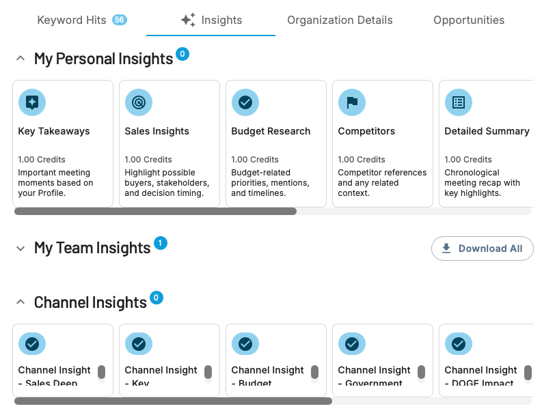
- Personal Insight - Analyzes this specific meeting through the lens of your profile. Use this to quickly assess relevance, understand the political context, and draft a summary for your team or leadership.
- Channel Insight - Analyzes meetings across that Channel's full history. Use this to track how sentiment on an issue has shifted over time, identify who the most influential voices are, and understand a body's overall disposition toward your issues.
Cloverleaf AI offers government affairs-specific insight types designed for exactly this kind of work - surfacing threats, opportunities, key influencer sentiment, and issue trajectory across a government body's full meeting history.
To run one, select Personal Insight or Channel Insight from the Insights section, choose your briefing type, and confirm. Your briefing will appear in the Insights tab and can be copied and shared with anyone on a paid Cloverleaf AI account - including colleagues, leadership, lobbyists, or outside counsel.
Tip: Use the Key Influencers Channel Insight before engaging an official - it surfaces their sentiment history and how their position on relevant issues has evolved over time.
Step 5: Track Opposition and Coalition Activity
Government affairs isn't just about monitoring your own issues - it's about knowing who else is in the room and what they're saying. Cloverleaf AI captures public testimony and comment periods alongside official meeting discussion, so you can track advocacy activity from third-party groups, not just elected officials.
Set up dedicated Campaigns to monitor:
- Opposition organizations by name - track when and where they're showing up
- Allied organizations - understand what arguments are landing and with whom
- Individual advocates, lobbyists, or consultants tied to competing interests
- Public comment periods where organized opposition often appears first
Tip: Run a Key Influencers Channel Insight on a body you're focused on to quickly understand who holds the most sway and where they stand on your issues.
Step 6: Know Your Stakeholders
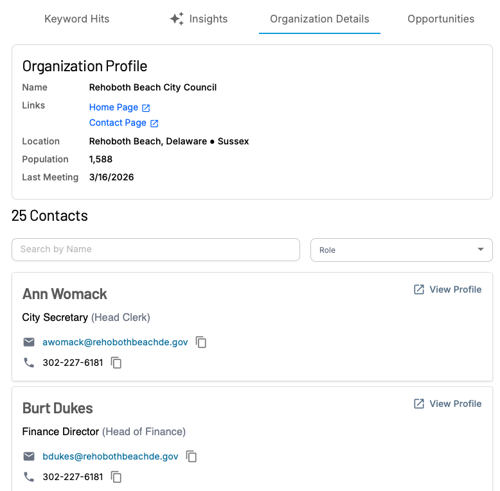
Once you've flagged a relevant meeting, find the right people to engage. Navigate to the Channel Detail Page for that government body to access:
- Links to the agency's home page and contact page - updated monthly with elected officials and top leadership
- Verified Speaker profiles showing who is active in that body's meetings and what topics they engage on
- Person Detail Pages for any verified speaker - search everything they've ever said by keyword to understand their full history on your issues before you reach out
Step 7: Brief Your Team and Document What You Find
Keep your team informed and build your institutional record by sharing and saving what you find.
Share Generate a shareable Cloverleaf AI link from any transcript snippet and send it to colleagues, leadership, lobbyists, or outside counsel. Recipients without an account will be prompted to create a free one to view the meeting. Personal Insights can be copied directly and shared as executive briefings or situation reports.
Bookmark Organize your most important findings for follow-up, reporting, or future reference:
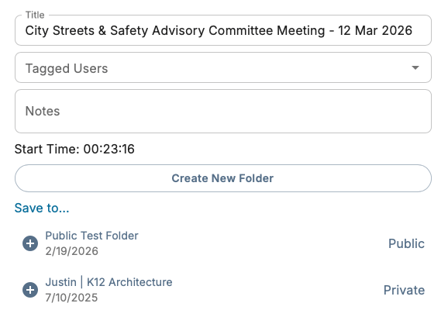
- Click the star icon next to the most relevant transcript snippet
- Add context, analysis, or recommended next steps in the Notes section
- Tag a teammate so they're notified
- Add to an existing folder or create a new one with + Create New Folder
Your Daily Government Affairs Routine
- Morning - Review your Signals email for policy mentions, client references, and opposition activity
- In the meeting - Use timestamps to find the exact moment and assess context and tone
- Dig deeper - Run Personal or Channel Insights to brief your team without reading full transcripts
- Track the landscape - Monitor opposition, coalition partners, and third-party advocates through dedicated Campaigns
- Know your stakeholders - Use Channel and Person Detail Pages to track officials and understand their positions
- Document and share - Bookmark key findings and share briefings with your team, leadership, or outside counsel
Questions? Contact us at support@cloverleaf.ai