
Date Filter
At the top of the homepage, use the date filter to set the time range for your metrics and signals view. Choose from the last 7, 30, or 90 days, or set a custom date range.
Admin users can view any team member's usage and signals by selecting them from the View As button - useful for reviewing activity across your team without switching accounts.

Metrics Tiles
Below the date filter, four tiles display key activity metrics for the selected date range:
Meetings / Documents Analyzed
The number of unique meetings and documents analyzed across all insights generated for you in the selected date range.
Meetings / Documents Viewed
The number of meeting and document detail pages you opened in the selected date range.
High Value Signals
Insights with a score of 7 or higher generated in the selected date range - your strongest leads and most relevant findings.
Active Campaigns
The total number of Campaigns currently assigned to or owned by you.
Signals Feed
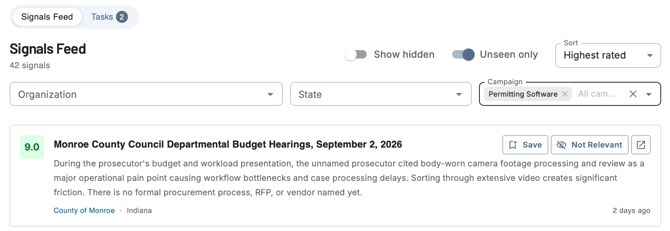
The left side of the homepage displays your Signals Feed - a running list of all signals you've received in your daily and weekly Signals emails.
Searching and Sorting
- Use the search bar to find a specific signal by keyword or meeting name
- Sort by Highest-Rated or Newest signal first - defaults to Highest-Rated
Filtering
- Filter by Campaign - Narrow the feed to signals from a specific Campaign
- Filter by Organization - Narrow results to a specific municipality or government entity
- Filter by State - Limit signals to a specific state
- Toggle between Unseen and Seen signals
- Unseen - Signals that were sent to your email but not yet clicked on
- Seen - Signals you've previously opened
Interacting with Signal Cards
Each Signal card has several ways to interact with it:
- Click the card - Opens the Signal summary so you can read the full insight without leaving the homepage
- Click the channel name - Opens the Channel Detail Page for that government entity
- Click the view meeting/document button on the far right - Opens the full meeting or document. If the signal came from a Campaign, the Campaign's search terms are carried through so you land on the meeting or document with those keywords already applied
- Click Save - Adds the Signal to your Tasks feed so you can come back to it later
- Click Hide - Removes the Signal from your feed
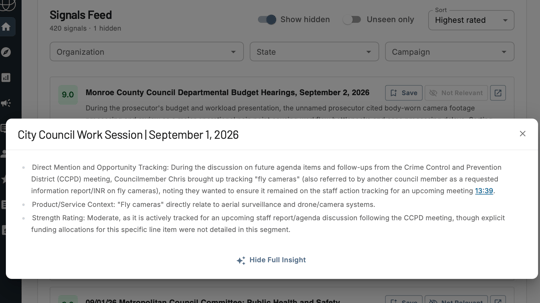
Finding Hidden Signals
If you've hidden a Signal and want to find it again, use the Show Hidden toggle at the top of the Signals Feed to surface any signals you've previously hidden.

Tasks Feed
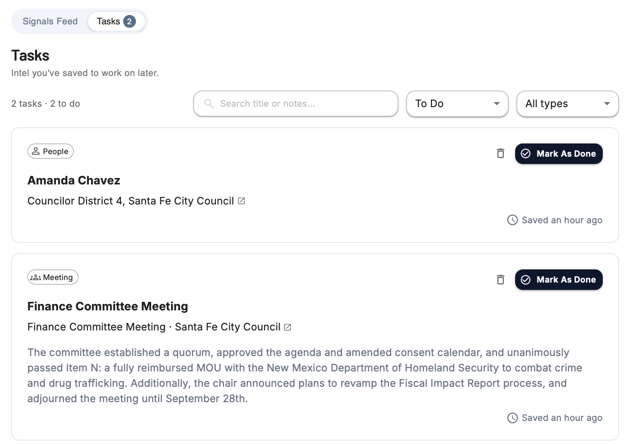
The Tasks Feed lets you save signals you want to come back to and track them like a to-do list. When you click Save on a signal in the Signals Feed, it lands here.
Filtering Your Tasks
- Use the search bar to find a task by keyword
- Filter by Status - All, To Do, or Done
- Filter by Type - All Types, Meetings, Documents, or People
Managing Tasks
Each task supports three actions:
- Mark as Done - Moves the task to the Done list
- Mark as To Do - Moves a completed task back to the To Do list
- Delete - Completely removes the task from your Tasks feed
View As
Admin users have a "View As" button which allows them to view a specific user on their team's overview page.


Questions? Contact us at support@cloverleaf.ai